What Is Included in a BespokeBooth Membership?
A BespokeBooth membership gives photo booth owners more than access to a template library.
It combines ready-made photo booth templates, a branded client template-selection widget and professional editing support in one membership. Instead of finding a design, editing every file yourself and managing client choices through long email conversations, you can use one clearer workflow from selection through to finished artwork.
Both Pro and Pro+ memberships include the complete stock-template service. Pro+ also includes original custom template designs for businesses that regularly receive more specific client requests.
This guide explains exactly what is included, how each part works and which membership may be the best fit for your photo booth business.
Quick Summary
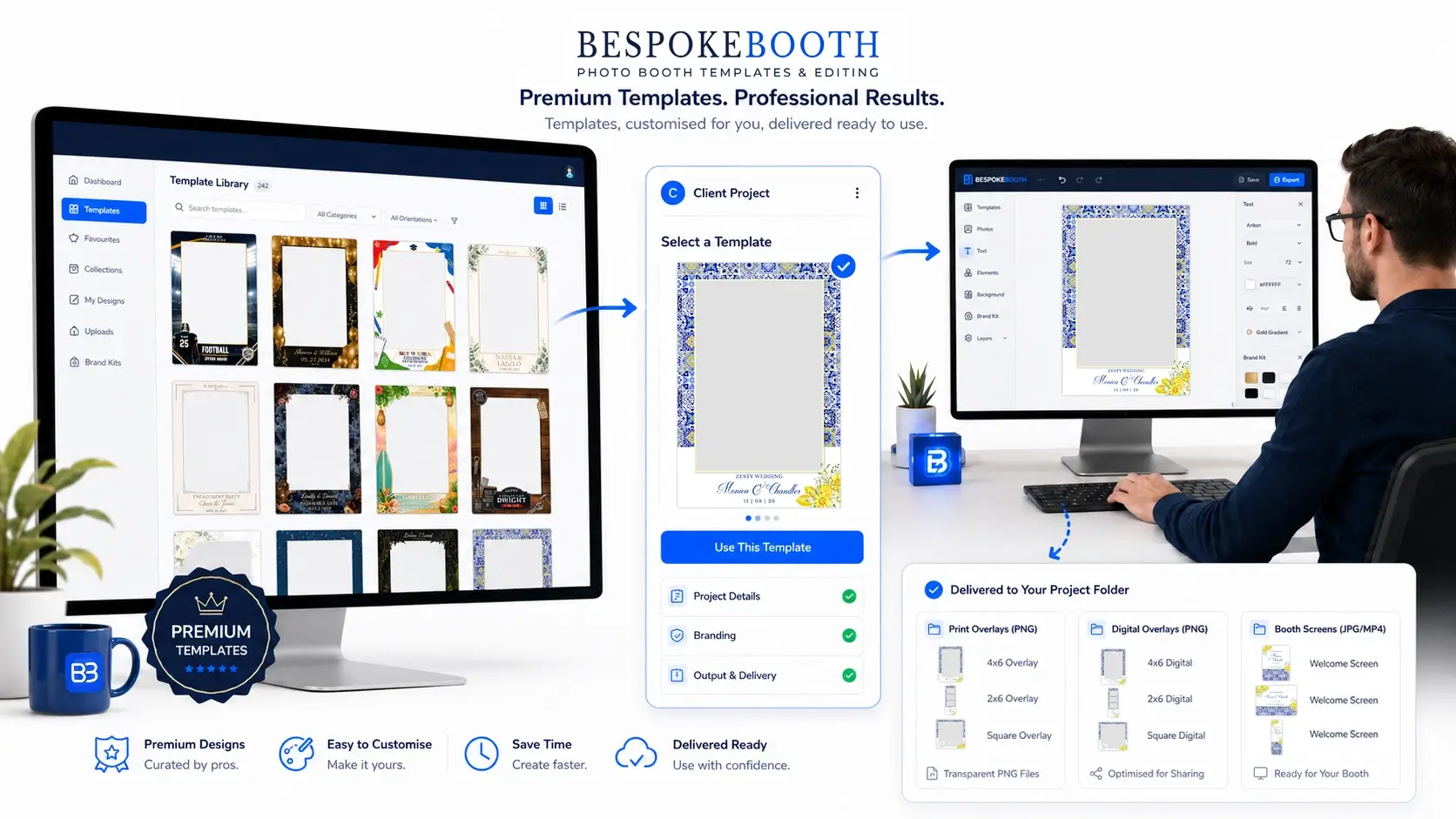
A BespokeBooth membership combines a large professional template library with a branded client selection widget and a done-for-you editing service. Both Pro and Pro+ members can download templates, allow clients to choose designs and submit stock templates for professional personalisation. Pro+ also includes original custom template design credits.
What is included with a BespokeBooth membership?
Both Pro and Pro+ members receive:
- Unlimited access to the complete stock-template library
- More than 5,000 photo booth templates and related booth assets
- Canva, Photoshop and booth-ready files where available
- A branded client-facing template widget
- Professional editing for up to 150 stock-template submissions per membership year
- Finished booth-ready artwork
- New designs added throughout the year
- Access to member support and guidance
Pro+ includes all of the above, plus an allowance of original custom template designs.
1. Unlimited access to the complete template library
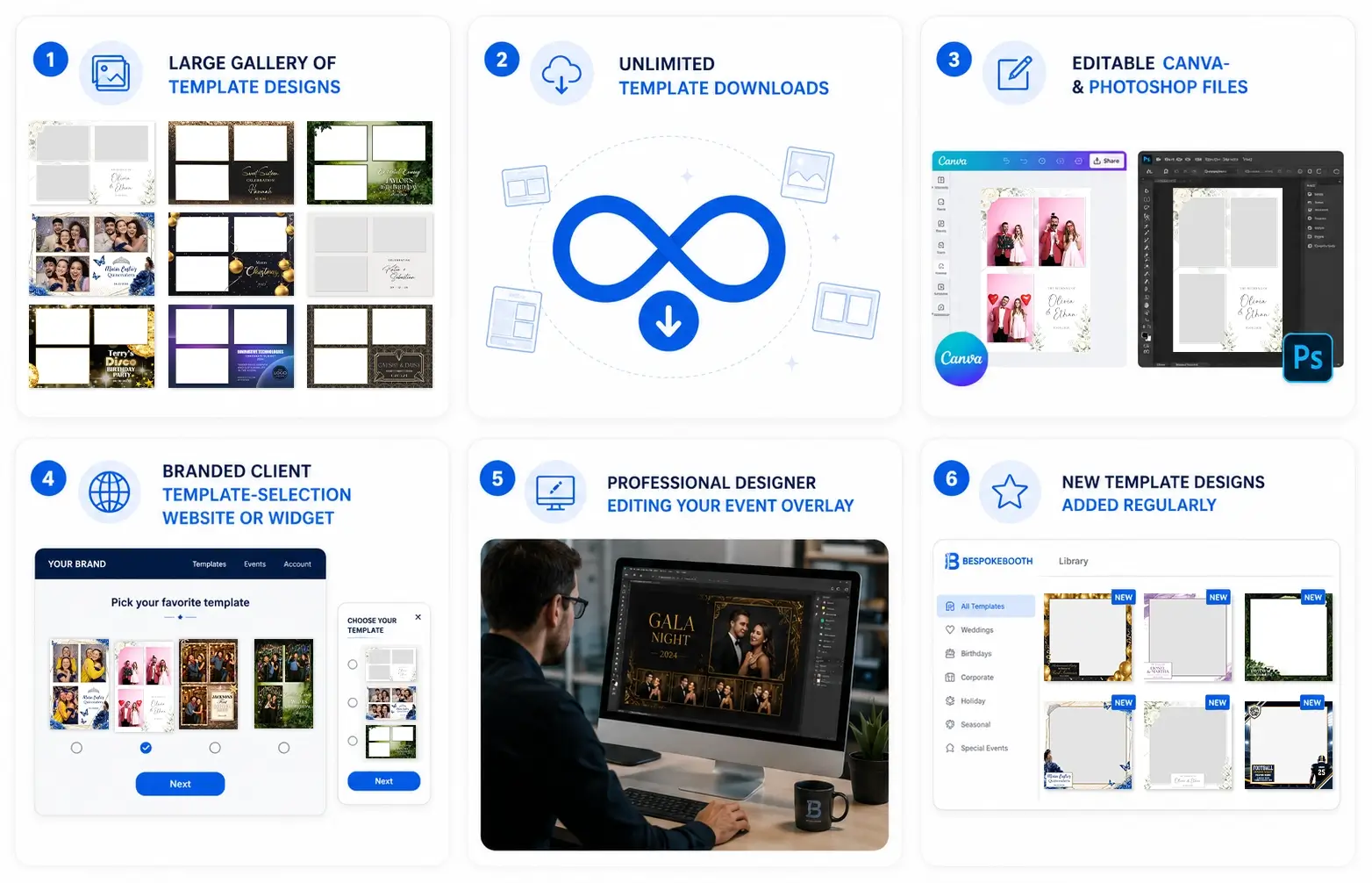
Your membership gives you unlimited downloads from the BespokeBooth template library.
The collection includes designs for weddings, birthdays, corporate events, graduations, seasonal celebrations, school events, cultural occasions and many other popular event themes.
Members can browse different layout categories, including:
- 2 × 6 photo strips
- Portrait 4 × 6 templates
- Landscape 6 × 4 templates
- Square digital layouts
- 360 booth overlays
- Glam Booth designs
- Magazine covers
- Static booth start screens
- Animated booth start screens
- Photo booth buttons
You can explore the current collection on the BespokeBooth template library.
Practical example
Imagine that you receive bookings for a wedding, a graduation party and a corporate summer event in the same week.
Rather than buying three separate template packs, you can search the membership library for suitable designs and download the files you need for each event.
You are not limited to a certain number of template downloads.
2. Editable Canva and Photoshop files
Many BespokeBooth products include editable source files, making it easier to adjust designs for different clients and events.
Depending on the product, this may include:
- Layered Photoshop PSD files
- Editable Canva templates
- Transparent PNG overlays
- Static start screens
- Animated start screens
- APNG or MP4 animation files
- Matching photo booth buttons
Photoshop files provide detailed control over individual design elements. Canva versions offer a more accessible option for members who do not regularly work in professional design software.
You can change details such as names, dates, wording and colours without rebuilding the design from the beginning.
However, you do not have to edit the templates yourself. Professional stock-template editing is also included with both memberships.
3. Professional template editing
Both Pro and Pro+ include professional editing for up to 150 stock template submissions per membership year.
You can choose a design from the library, provide the event information and let the BespokeBooth editing team prepare it for you.
Typical personalisation can include:
- Changing names and event dates
- Updating wording
- Adjusting text colours
- Changing suitable background or design colours
- Adding a usable client logo
- Adding certain supplied design assets
- Preparing the final overlay for the required layout
Completed artwork is returned to you rather than being sent directly to your client. This means you remain in control of the client relationship and final delivery.
Practical example
A wedding client chooses a floral photo strip but wants the names, wedding date and colours changed to match a navy and gold theme.
Instead of opening Photoshop and adjusting the file yourself, you can submit the details through the editing workflow. The BespokeBooth team personalises the selected design and supplies the completed file for you to review and use.
What counts as one edit?
One stock-template submission counts towards your annual editing allowance.
One stock-template submission counts towards your annual editing allowance. Revisions and additional layouts for the same submitted design do not normally count as separate submissions.
Members who need more than 150 stock edits per year can contact BespokeBooth to discuss higher-volume options.
4. Finished booth-ready artwork
The editing service is not simply a text-changing service. Its purpose is to provide artwork that is prepared for use with your photo booth workflow.
The completed transparent overlay can be added to your photo booth software using the appropriate template coordinates.
This is especially useful for booth owners who:
- Are not confident using Photoshop
- Do not have time to edit designs between bookings
- Prefer to outsource repetitive artwork preparation
- Want a more consistent standard across client events
- Need support preparing different photo booth layouts
You still remain responsible for loading the final artwork into your booth software, checking the photo placement and testing the event before delivery.
5. Your branded client template widget
Both Pro and Pro+ include access to a branded client-facing template widget.
The widget gives your clients one convenient place to:
- Browse available template designs
- Search or filter the collection
- Preview individual designs
- Choose their preferred template
- Submit their event information
- Request relevant personalisation
Your widget can use your business identity and is hosted on a dedicated BoothWidget subdomain. You can share the link directly, place it behind a button on your website or embed it into a suitable webpage.
Learn more on the Template Widget page or explore the interactive widget demonstration.
Why is the widget useful?
Without a widget, a photo booth owner may need to:
- Create or send several template galleries.
- Wait for the client to identify a design.
- Request names, dates, colours and other information separately.
- Search through emails or messages for the final details.
- Prepare or submit the artwork for editing.
With the widget, the client can choose a design and provide their event information through one clearer process.
The submission can then enter the BespokeBooth editing workflow, reducing manual administration for the photo booth owner.
Can you control what clients see?
Your widget can be configured around the types of products you offer.
For example, you may choose to show:
- Particular print-layout formats
- Glam Booth designs
- Static start screens
- Matching screen layouts
- A custom design request form
You do not need to offer every format if it is not relevant to your booth packages.
6. New templates added throughout the year
BespokeBooth continues to add new designs to the membership library.
These may cover upcoming seasons, popular event styles, business events, weddings, birthdays and more specific celebration themes.
New additions help members keep their template offering current without needing to purchase every new design separately.
Existing members can access newly added stock templates as part of their active membership.
Pro vs Pro+: which membership do you need?
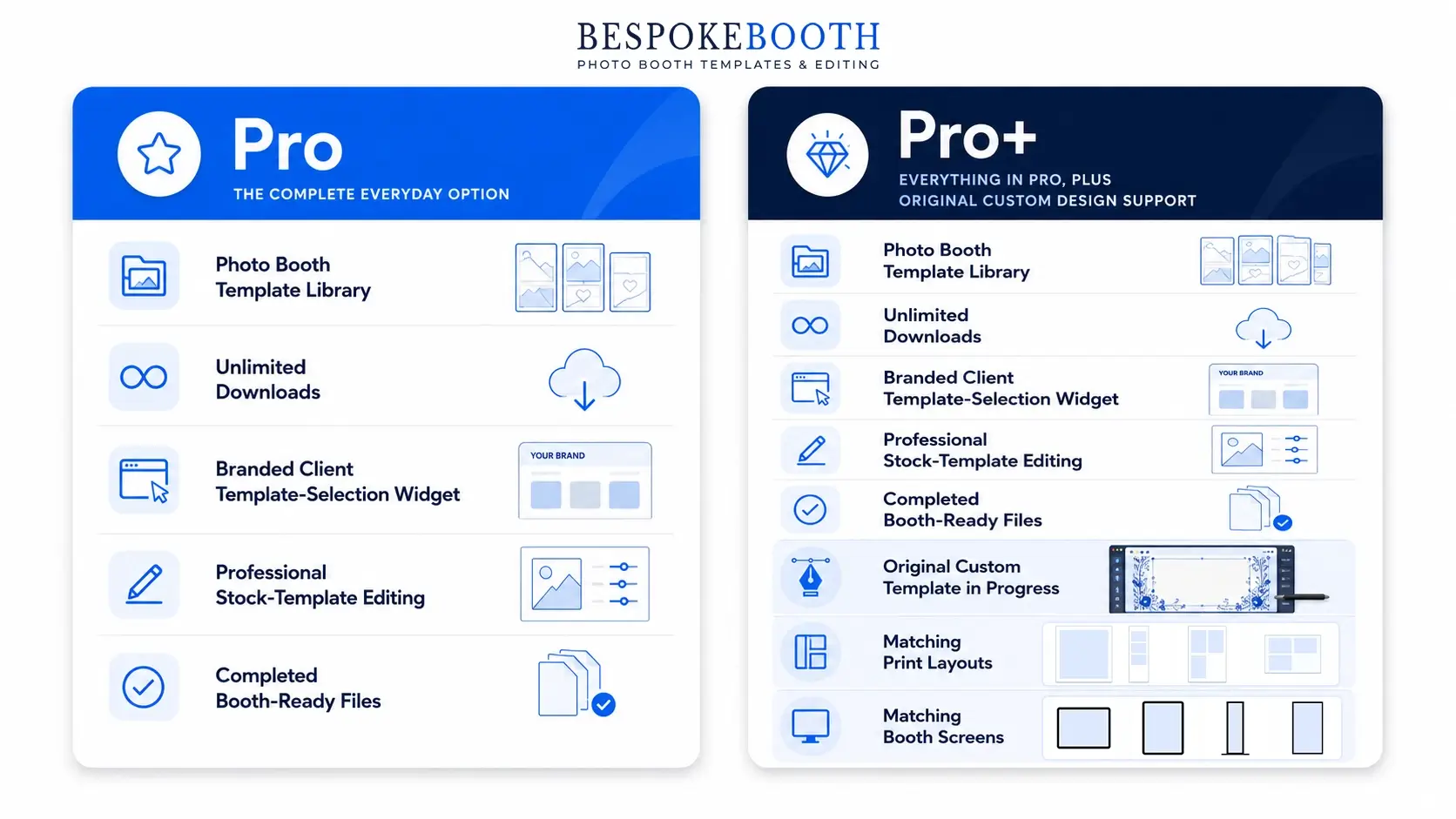
Pro costs $169 per year and is intended for photo booth businesses that mainly work with ready-made designs.
Pro includes:
- The complete stock-template library
- Unlimited template downloads
- Canva, Photoshop and booth assets where available
- Your branded client template widget
- Up to 150 professional stock-template edits per membership year
- Finished booth-ready artwork
- New stock designs added throughout the year
Pro is usually the best choice when your clients can select from an existing design and request normal personalisation such as names, dates, wording, logos or colour changes.
What is included with Pro+ membership?
Pro+ costs $199 per year and includes everything provided with Pro.
It also includes:
- Up to 20 original custom template designs per membership year
- Additional layouts for those custom designs
- Matching custom start screens
- Priority support
Pro+ is intended for photo booth businesses that regularly receive requests for designs that are not already available in the stock library.
Practical Pro+ example
A corporate client asks for a completely original template based on its campaign branding, logo, colour palette and event theme.
Because the request requires a new design rather than personalising an existing BespokeBooth template, it would be treated as a custom design.
A Pro+ member can submit this through the custom design workflow and use one of their annual custom design credits.
The main difference is whether you need original designs created.
Choose Pro when:
- You normally use ready-made templates
- Your clients mainly request text, logo or colour changes
- You want professional editing handled for you
- You want clients to choose templates through your widget
- You do not regularly need entirely new designs created
- Finished booth-ready artwork
- New stock designs added throughout the year
Choose Pro+ when:
- You need everything included with Pro
- You receive highly specific or unusual client requests
- Corporate clients regularly require original branded concepts
- You want matching layouts and screens created for custom designs
- You expect to use the custom design service throughout the year
- Request relevant personalisation
For many photo booth businesses, Pro provides the complete everyday workflow. Pro+ is most valuable when original design requests are a regular part of the service you offer.
You can compare the current options on the BespokeBooth pricing page.
How the complete BespokeBooth workflow works
The process can be kept simple:
Step 1: Offer clients a choice of designs
Send the client your branded widget link or direct them to the widget through your website.
Step 2: The client chooses a template
The client browses the available designs and selects the one they prefer.
Step 3: Event details are submitted
The client provides information such as names, dates, wording, colours, logos and personalisation notes.
Step 4: The selected design is edited
The BespokeBooth editing team prepares the requested stock-template personalisation.
Step 5: You receive the completed artwork
The final file is supplied to you so that you can review it, add it to your booth software and deliver it as part of your event service.
See the full process on the How BespokeBooth Works page.
What is not included?
To avoid confusion, there are a few responsibilities that remain with the photo booth owner.
BespokeBooth does not normally:
- Communicate directly with your client
- Send the completed artwork directly to your client
- Install the file into your photo booth software
- Test your booth, printer or event equipment
- Guarantee that every supplied asset can be recoloured
- Create unlimited original custom designs with Pro
- Provide unlimited stock-template edits
Keeping the final communication and delivery with you protects your client relationship and allows you to complete your normal event checks.
A complete design workflow for photo booth owners
BespokeBooth is designed for professional photo booth businesses that want an all-in-one template, client-selection and editing workflow.
Its strongest advantage is not simply its collection of more than 5,000 designs. It is the way the library connects with a branded client-selection widget, professional editing and finished booth ready files.
It is particularly well suited to established operators, growing businesses and owners who want to offer clients plenty of design choice without personally managing every design task.
Businesses that only need an occasional individual template may prefer a pay per wdesign option. However, operators handling recurring events are more likely to benefit from the complete membership.
Frequently Asked Questions
Yes. A branded client template-selection widget is included with both Pro and Pro+.
The widget allows clients to browse designs, choose a template and provide their event details through one organised process.
No.
Photoshop files are available for members who want detailed editing control, and many products also include editable Canva versions. You can also use the included professional editing service instead of editing stock templates yourself.
There is no set stock-template download limit while your membership is active.
You can browse and download designs from the complete membership library as needed.
Pro and Pro+ currently include up to 150 stock-template submissions per membership year.
One stock template submission counts towards your annual editing allowance. Revisions and additional layouts for the same submitted design do not normally count as separate submissions.
Pro+ includes up to 20 custom designs per membership year. The allowance resets on your membership renewal date, and unused credits do not normally roll over into the following year.